
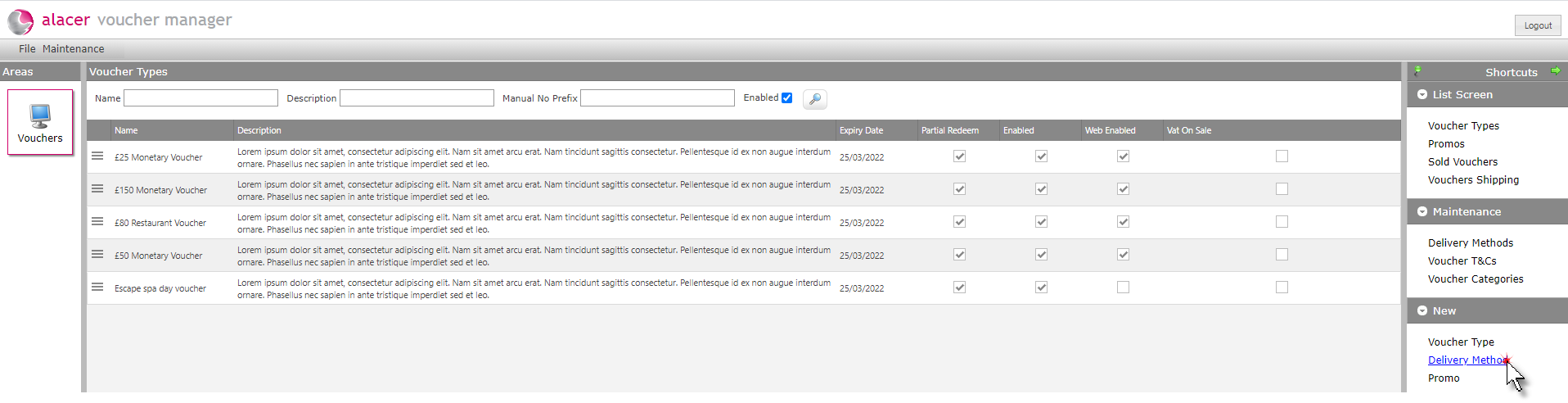
1. Click on Delivery Method under the New shortcut.
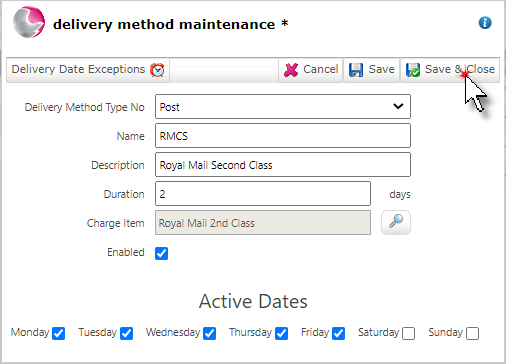
2. Complete the delivery method maintenance form.
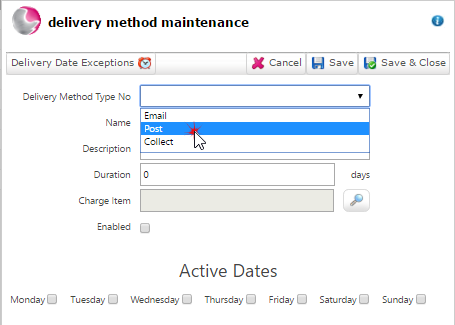
3. Select the delivery method type.
There are three voucher delivery types available:
Collection - The voucher is purchased and then collected from the premises.
Email - The voucher is purchased by a customer and then emailed to a recipient and printed.
Post - The voucher is purchased online by a customer and the physical voucher is send to a recipient
Alacer can provide a voucher fulfilment service, to find out more please contact the sales team on 0333 313 0066 - Option 1.
Name: Enter the name of the delivery method
For example: First Class, Second Class.
Description: Enter the long description for the delivery method.
Duration: When a voucher is sold and a delivery method is selected, the amount of days entered into this field will calculate an estimated delivery date.
Charge Item: Select a charge item for the postage. This item will need to created in admin manager as a new item and should be priced at the cost to deliver the voucher.
Can't find it? See How to Create a New Item(Admin Manager)
Enabled: Click enabled to make the delivery method active.
Active dates: Select the days of the week that the delivery method is active / voucher can be posted.
4. Click Save & Close.
See next: How to Setup Delivery Date Exceptions
How to Create Voucher Terms & Conditions